Plan, design and cost outdoor events and festivals.
Airship Event Designer is built for festivals, shows, concerts and community days. Size the event from the attendance, lay out the site, and check it against UK event guidance — with every figure showing what it rests on, and saying so where it is our own judgement. The drawing, the Event Safety Plan appendix, the hire budget and the supplier quote request all come out of one model.
In beta, switched on per account, on Pro and above. Already have an account? Tick Preview BETA features in your profile to register your interest.
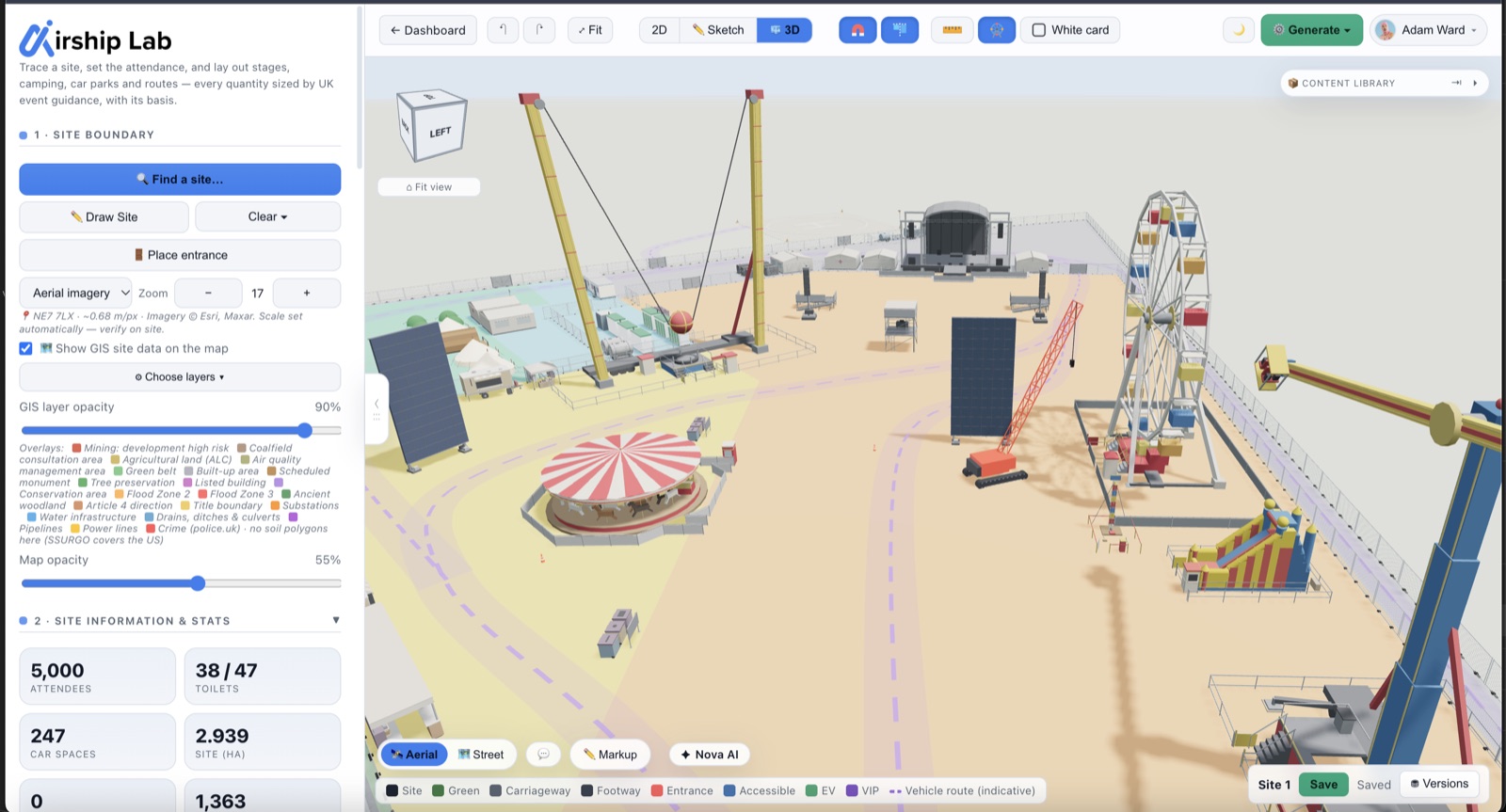
For the people who have to put the site plan in front of someone
Event Designer is built on Airship Site Designer, the housing and car-park layout tool, and pointed at outdoor events.
Event organisers and production companies
Anything from a 500-person community day to a multi-day camping festival: the site plan, the welfare numbers, the build and derig, and the hire budget in one place.
Event safety consultants
A site plan and a schedule of findings to put in front of a Safety Advisory Group (SAG), each finding saying what it rests on and how well that basis has been checked.
Landowners and venues
Estates, showgrounds and parks that host events: draw the field and show each arena and campsite's capacity at published occupant densities, before exits and structures.
Local authority event teams
Reviewing what an organiser has submitted: a review link opens the plan in every phase, the schedules and the findings read-only — with comments, and no account needed.
Rapid site and event designSize it, draw it, check it, cost it, issue it
One model from the first headcount to the drawings you hand over. Change the attendance or move a fence and everything downstream moves with it.
Size the event
Attendance, days, gate hours, whether people camp. Six event types to start from, from a community day to a camping festival or a funfair.
Lay out the site
Zones, car parks, barriers and trackway on your boundary, and objects from a library built for events.
Check it
Findings pinned on the plan where they apply, each with its basis and how well that basis has been checked.
Cost it
A hire line for everything drawn, priced for the phases it is on site — then a supplier-neutral quote request for the hire, and quotes from the vendors you choose.
Issue it
The Event Safety Plan appendix, drawings at true scale, 3D views, schedules and review links.
Find your site on a map, trace its boundaryWe show what the site needs, and what each number rests on
Enter attendance, days, gate hours and whether people camp. The model works out toilets, hand-washing, drinking water, first aid, stewards, entry lanes, exit width, campsite ground, waste and car parking — and every line says where it came from.
| Line | Quantity | What it rests on |
|---|---|---|
| Female toilets | 34 units | ReproducedIndustry guidance1 per 75 where gates are open 6 h or more with alcohol and food, on a 50:50 split — council reproductions of the Purple Guide |
| Hand-wash units | 9 units | CheckedOfficial guidanceOne per five toilets, never fewer than one per ten — HSG195 §519 (withdrawn 2014) |
| Drinking water points | 7 outlets | CheckedOfficial guidanceOne outlet per 750 — HSG195 para 1009 (withdrawn 2014), a figure for all-night music events; applying it to a day event with alcohol is our extension, and the line says so |
| First aiders (quick estimate) | 6 people | CheckedOfficial guidanceTwo per 1,000 for the first 3,000 — HSG195 para 737 (withdrawn 2014); above about 3,000, plan medical cover with your provider |
| Entry lanes | 5 lanes | Assumption1,500 arrivals an hour at peak ÷ 300 an hour a lane for scan and bag search — our planning assumption; no UK source publishes a search-lane rate |
| Aggregate exit width (indicative) | 7.6 m | CheckedOfficial guidance5,000 ÷ (82 persons a metre a minute × 8 min) — Green Guide rates of passage |
| Waste arising | 2.5 t | CheckedBenchmark0.5 kg a person a day for a non-camping festival — AGF Festival Sustainability Insights 2024 |
| Car parking | 1,200 cars | Assumption60 % arriving by car ÷ 2.5 people a car — our default, from council-filed traffic plans; edit it to your event |
- CheckedPrimary source read; the figure is reproduced as published.
- ReproducedConsistent across council reproductions of the guidance; the primary text (here the Purple Guide, by subscription) has not been read by us.
- AssumptionNo published UK ratio — an editable assumption, to be replaced by your own figures.
Zones, objects and rides, drawn on your boundary
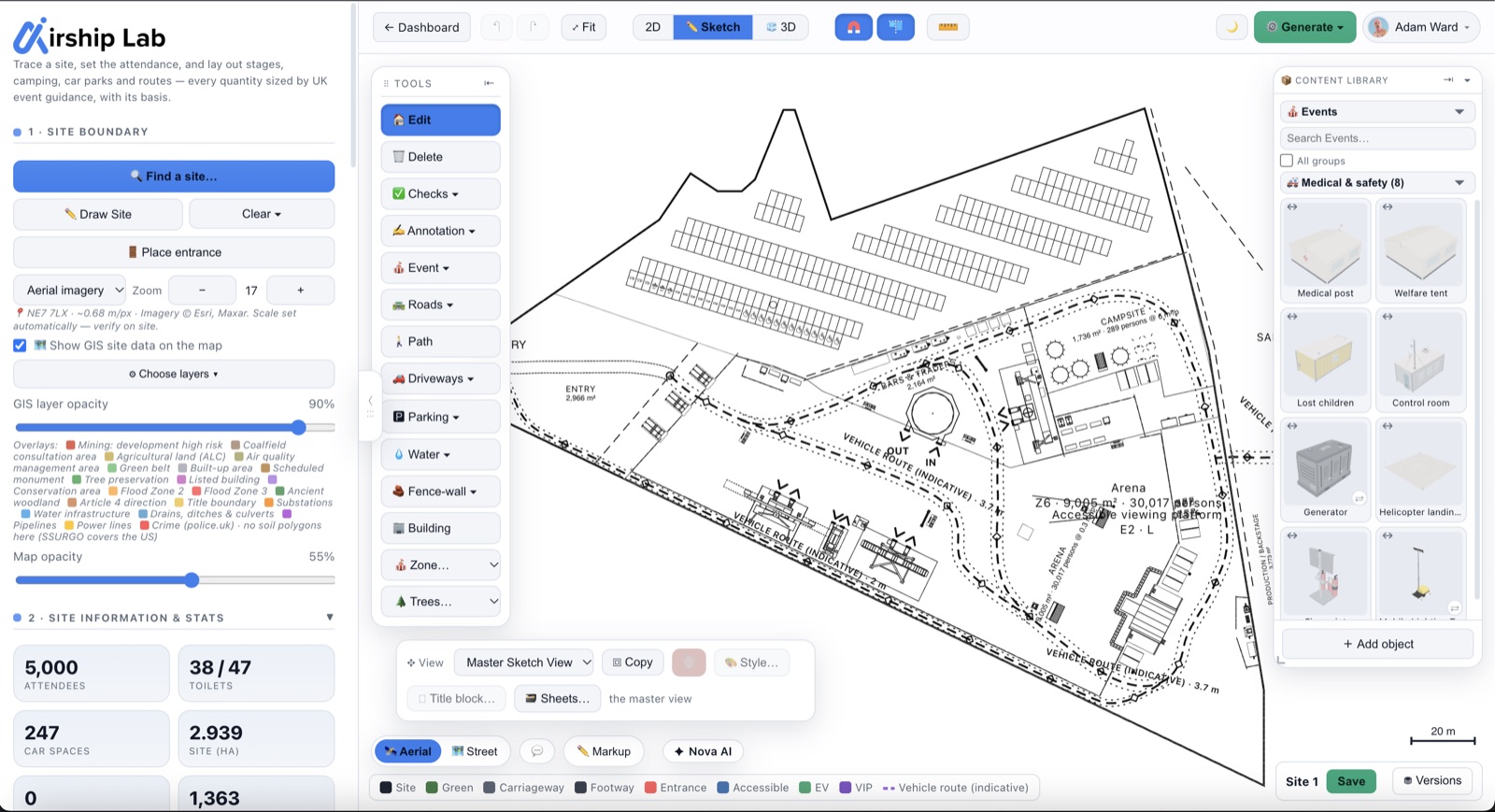
Draw or import the boundary, set the entrance and work over the aerial photo — or over your own CAD survey. Then build the site from zones and from a library made for events.
- Zones that know their capacityArena, campsite, entry, welfare, production and backstage, and safer areas. An arena or campsite shows how many people it holds at the occupant densities in the gov.uk fire safety guide for open-air events.
- 84 purpose-built event objectsStages, screens and delay towers, LED screen trailers, a video wall, a projection screen and power distribution; marquees and stretch tents; toilets, hand-wash and showers; 36 bars and traders' units, from food trucks and vans to Christmas huts; medical posts, ambulances, a police car, generators and lighting towers; gates, turnstiles and search lanes; signage and wayfinding; bins and skips. With the 44 rides and attractions below, 128 objects made for event sites, beside the camping, site and traffic kit from the main library.
- A Stage builderFive presets, from a 6 × 4 m trailer stage to a 24 × 18 m arena end stage, then the deck, roof, wings and thrust to suit.
- 44 fairground rides, inflatables, attractions and side stallsFrom a juvenile roundabout to a 54 m tower swing, a climbing wall, an ice rink and a coconut shy. Each carries a typical capacity, operators, power draw and a modelled entrance and exit, with a minimum rider height on the rides — typical figures you set to the real ride's, and riders an hour is worked out from them.
- Barriers, trackway and event parkingHeras fence, pit barrier and crowd barrier runs; trackway sized for a fire appliance; and temporary parking on grass — marked spaces and marshalled lanes, nothing built — counted against the cars expected.
- Lines up, then locksObjects line up with each other as you place them, and lock when you are happy with them.
- Site security, with camera view splaysCCTV towers and portable sentries, each with a view angle, range and direction, drawn as a view splay on the sketch plan. They are part of the security layout, so review and share links never show them, and the appendix and DXF leave them out unless you tick it in.
- Real kit, modelledThe ambulances, police car, signs and banners, screen trailers, most food trucks and huts, and a quad bike are detailed 3D models at their own size. An ambulance is placed and scheduled, but it is not a medical post and is not priced: arrange cover with your provider.
Plan your Build, Live Event and BreakdownOne site, three phases
Every object, barrier and zone belongs to the phases it is on site. Switch the view and the site changes: the public areas appear for the live days, while the compounds the crew work from stay throughout. Set an event date and each phase is dated.
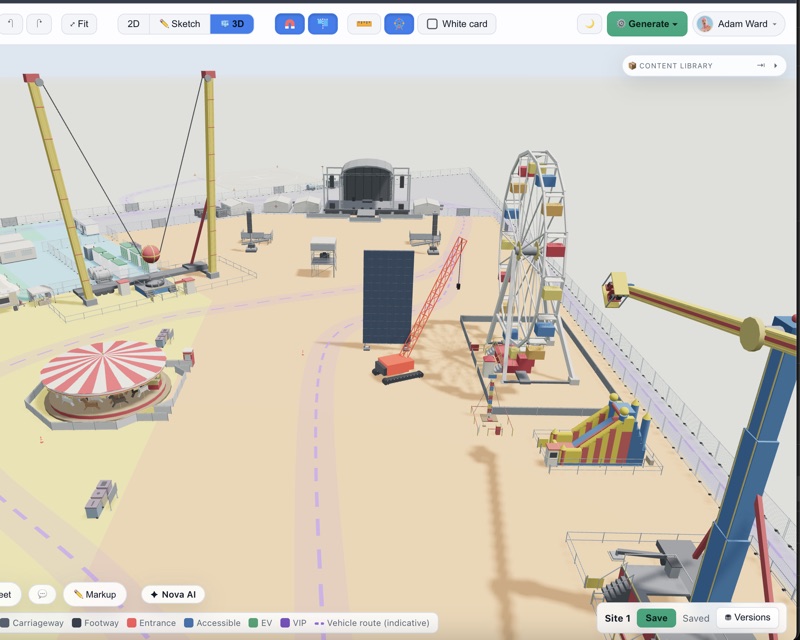
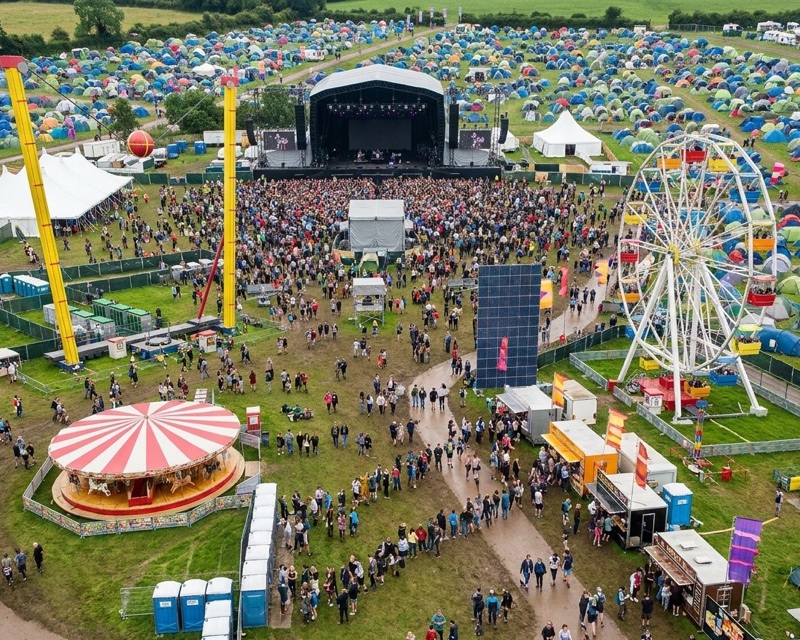 AI render
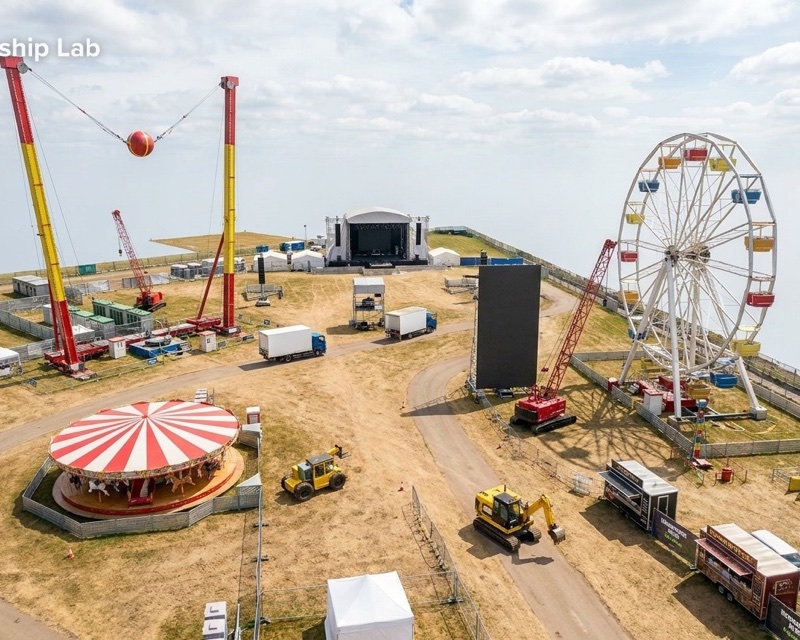 AI render
The hire budget follows the phases: each item is priced for the days of the phases it is on site, with weekly rates charged in whole weeks. Build, live and derig in the help centre
Check your design against the standards and guidanceProduce your drawings and plans with the working shown
Draw the site and the event rule pack reads it. Each finding is numbered, pinned on the plan where it applies, and says what it rests on.
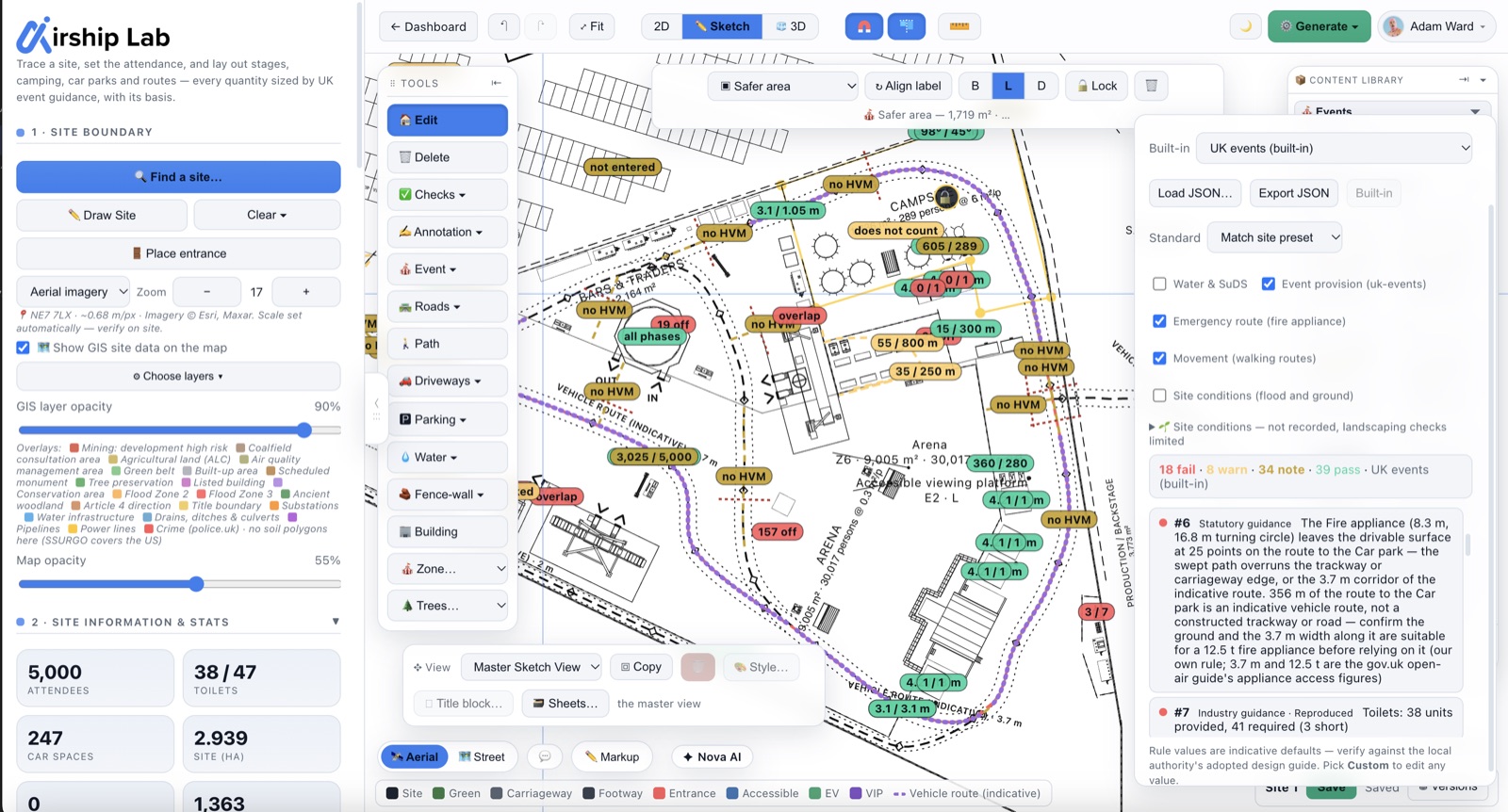
Provision against demand
Toilets, hand-wash, drinking water, the medical post, entry lanes, car parking, campsite ground and the arena's capacity, each against what the attendance needs.
Exits and travel distance
Exits from each enclosure and their widths, the travel distance to the nearest exit, and whether alternative exits are at least 45° apart.
The fire-appliance route
From the vehicle entrance to each zone, with a fire appliance's 16.8 m turning circle swept along it; trackway width; and the gates where fences cross the route.
Walking routes and the gate queue
Walking routes between zones, any zone a barrier has cut off, and the peak queue from the arrival profile against the space in the entry zone.
Fire safety and crew welfare
Extinguishers at each tent, the fire-risk level and its escape time, and crew toilets and basins for the build and the derig.
The layout around the rides
Ride envelopes clear of other rides, structures, fences and the boundary; entrances and exits onto clear ground; generator capacity against the rides' load; rides built before the public arrives; and, under the Wales model byelaw pack, fire-appliance access to every ride.
Every finding names its basis — Statutory guidance, Official guidance, Industry guidance, Benchmark or Assumption — and how well we could check it: Checked, Reproduced or Assumption.
Checked figures cite where in the source they were read. Where a figure or a threshold is ours, it says so on screen. That distinction is the one a Safety Advisory Group will test, so it is on every line rather than in a footnote.
The findings are inputs to your event safety management plan. The Safety Advisory Group and the licensing authority decide. Every source, and what is ours
Terrorism (Protection of Premises) Act 2025Ready for Martyn's Law before it comes into force
The duties of the Terrorism (Protection of Premises) Act 2025 are not yet in force. As read on legislation.gov.uk on 20 October 2026, no commencement day has been appointed; the SIA (guidance of 17 July 2026) expects commencement in spring 2027. Event Designer already reads the design against the Act, so what a site plan can show (the qualifying test, the vehicle approaches, barrier lines and safer areas) comes out of the drawing; the procedures, the section 7 document and the notification are still yours to prepare.
Does the event qualify?
The s.3(1) test, condition by condition — met, not met or unknown, each with its evidence. The answer is yes, no or unclear, naming what is unknown: never a guess.
A readiness checklist
Each duty a qualifying event would carry, marked shown on plan (naming the objects), to document, or not applicable with the reason the guidance asks you to record.
Vehicle security barriers and safer areas
Draw hostile-vehicle barrier lines and their openings, see the vehicle approaches to each crowd zone, and mark safer areas for sheltering people inside buildings or hard-sided structures.
Security material, handled deliberately
Everyone in your workspace sees the security layout in the editor, view-only members included. The appendix and the DXF leave it out unless you tick it in, and review links, share links and our admin support views do not draw it. Your own sheets, PNG, planning report, 3D, renders and Revit export show it, so restrict their circulation; a separate restricted Security plan PDF, for editors only, holds all of it. Hiding is not access control: a shared design still carries the data, so to hand a design to someone, send a copy made to send.
A readiness aid for the organiser — not the security document, and not legal advice. The status line is built into the app, not saved in your design, so a design saved today cannot keep saying “not in force” after the duties start. Martyn's Law readiness in the help centre
Site Intelligence overlays site data from GIS and published sourcesFlood, ground and weather for the site, each with its source
Three desk-study readings for the site, each naming its source and date and saying plainly what it does not cover. A starting point for the event safety plan — not a flood risk assessment, a site investigation or a weather forecast.
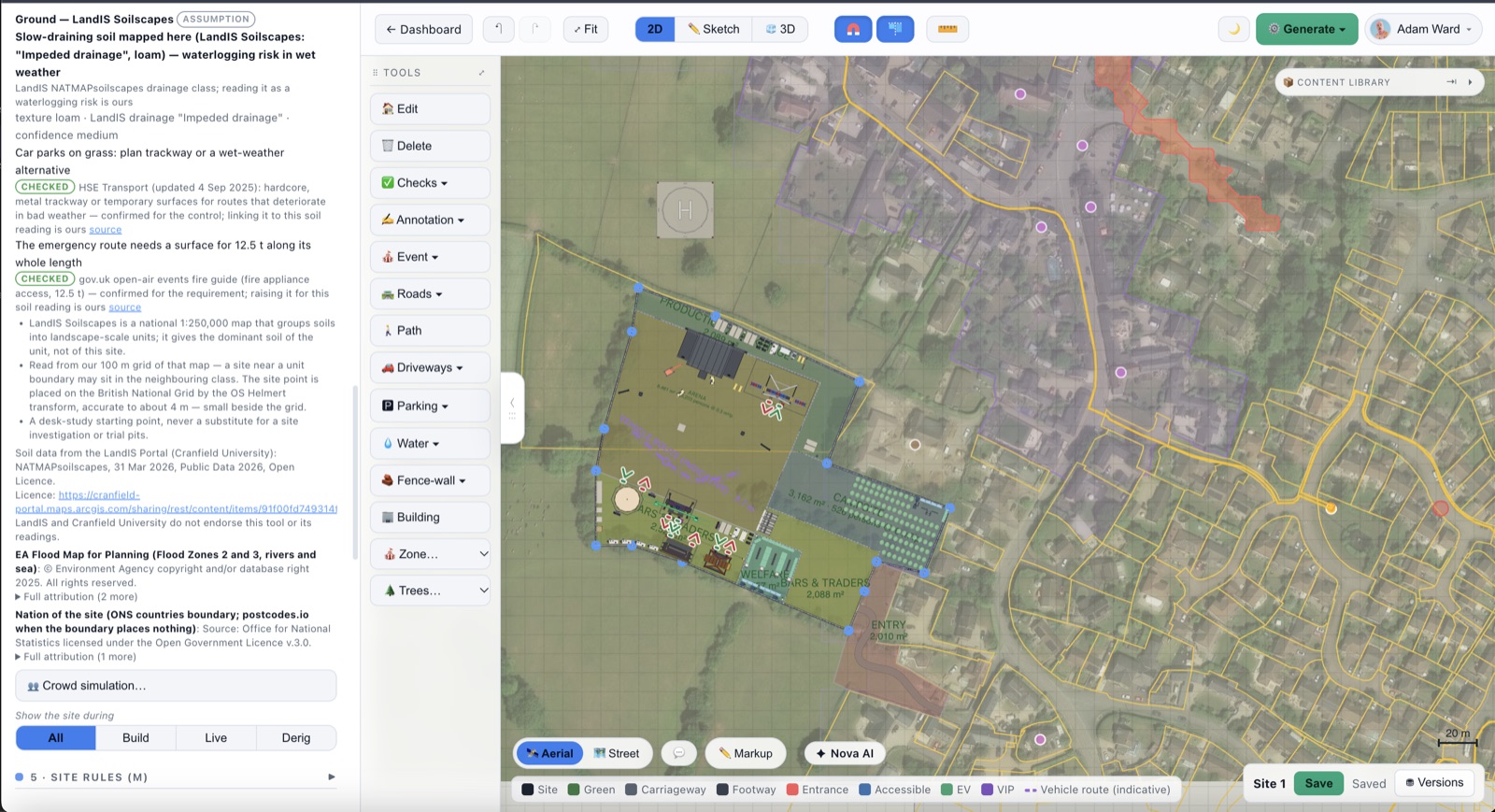
Flood, nation by nation
The share of each zone and car park in a mapped flood area, from the Environment Agency, Natural Resources Wales or SEPA — each nation's own map, named, with its own definitions. A campsite in the higher flood zone is flagged. Sites up to 5 km a side.
Soil and drainage
The soil at the centre of the site — LandIS Soilscapes in England and Wales, BGS parent material in Scotland — drives the trackway and parking-on-grass advice and flags ground that waterlogs.
Typical weather, never a forecast
The 1991–2020 average for the event's month, from the Met Office's regional series: rainfall and rain days, temperatures, sunshine and air frost. Wind is not in that source and reads “not in this source”, never 0. Watch the forecast in event week.
“Not checked” means not checked
A site in Northern Ireland, a site over 5 km a side, or a service that did not answer reads “not checked”, with the reason. It never shows a reassuring 0 % it has not earned.
Cost planning with your own supplier ratesIt costs the event, and raises the enquiries
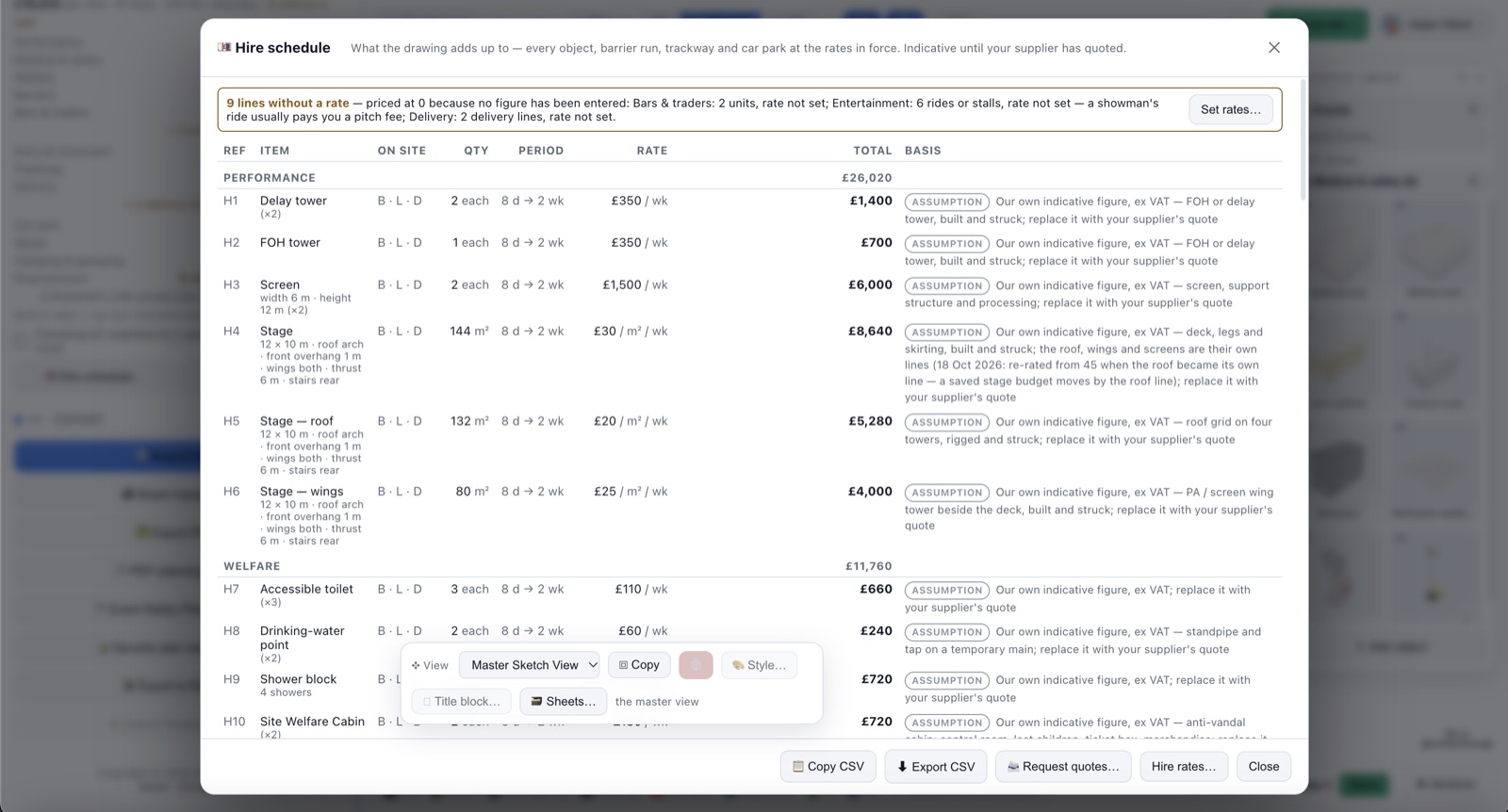
The drawing adds up: every event object, barrier run, trackway and car park becomes a hire line, grouped and totalled ex and inc VAT, and divided by the attendance.
Priced for the time on site
Each line carries its quantity, the days it is on site from its phases, a rate and a total. A weekly rate charges whole weeks; a per-event rate is one charge.
Your rates, or ours to start
Load your supplier's rates, or start from 60 built-in indicative rates. Those are our own order-of-magnitude figures, each badged Assumption until you replace it.
A quote request that matches the drawing
A supplier-neutral request for quotation for the hire, built from the design. You send it to whoever you choose: the app sends it to no one. Only the vendor quote requests below go out from Airship, and only to the vendors you pick.
No silent £0: a line nobody has priced reads “rate not set”. Not priced at all: crew and labour beyond welfare, security (vehicle security barriers included), medical cover, insurance, licensing and local-authority fees, power distribution and fuel, traffic management, and anything not drawn. VAT is added to the total as a guide, never by item. Hire schedule and budget
Traders, rides and attractions for your pitchesFind vendors, ask for quotes, accept the one you want
Vendors come with Event Designer on Pro and above, with no separate beta. Place a food unit, bar, ride or attraction, find vendors for it, and ask the ones you shortlist for a quote through the Airship vendor portal.
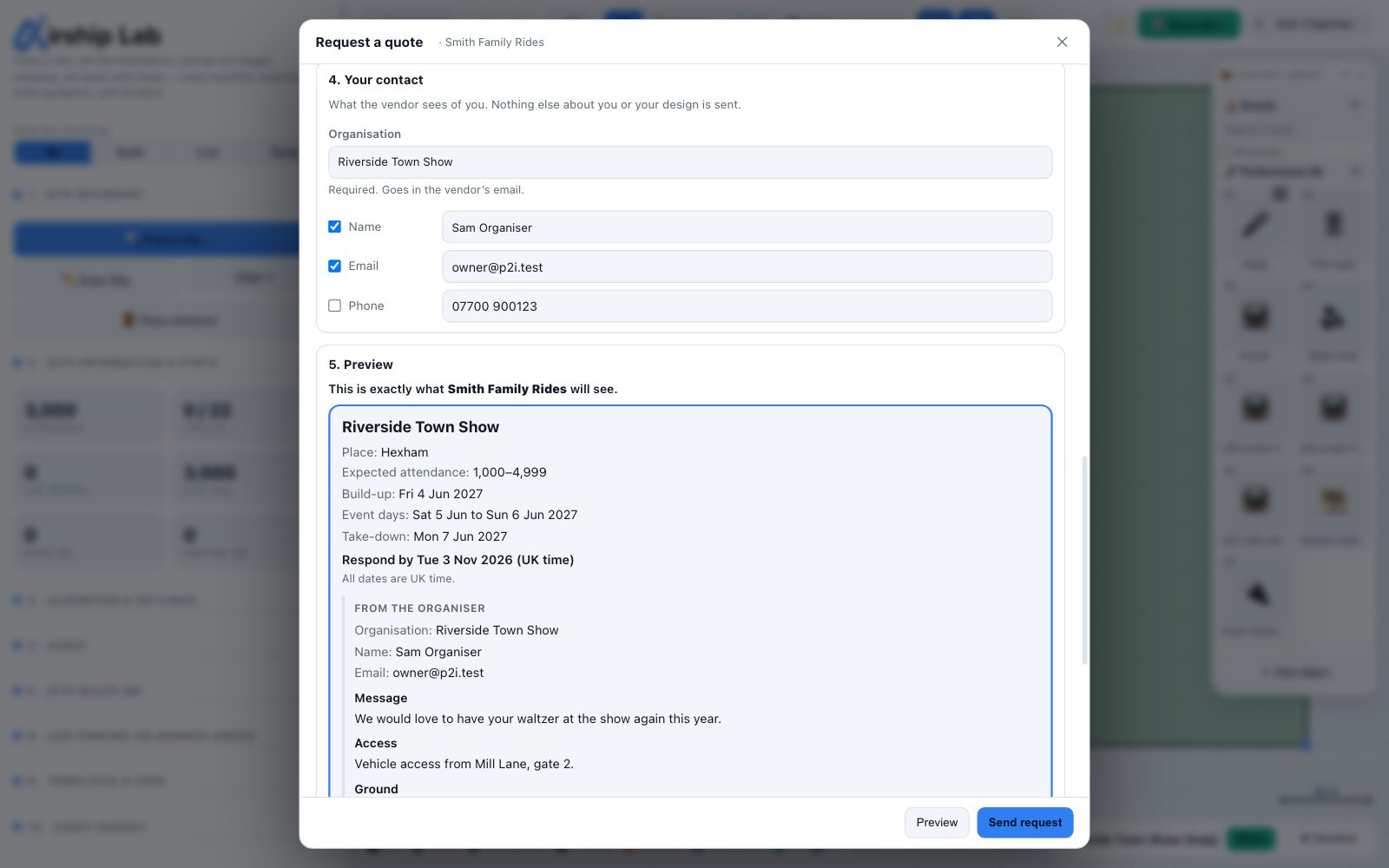
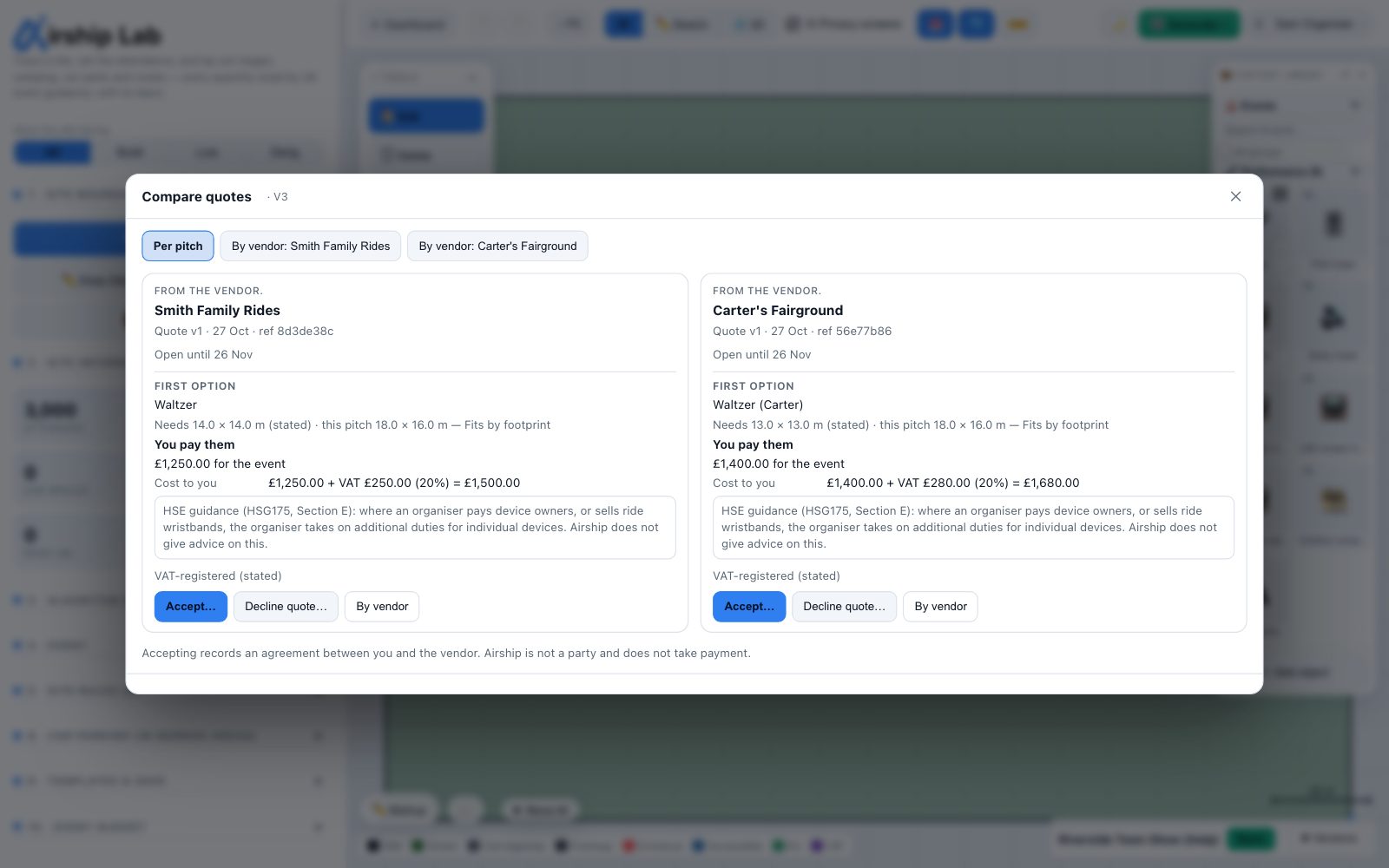
Find vendors and add them to pitches
Right-click a placed food unit, bar, ride or attraction to see the businesses we have listed and the traders you invited yourself. Each card shows the size, power and guide price the vendor states, and whether that size fits the footprint on your plan. Shortlist up to five a pitch.
Request quotes through the vendor portal
One request a vendor covers every pitch they are shortlisted on, and they answer pitch by pitch on the portal. The preview shows exactly what they will see: the pitches, dates, a town and an attendance band. Never your plan, other vendors, your budget or your security layout.
Compare and accept quotes
A pitch's quotes side by side, with cost to you and income to you in separate rows. Accept the lines you want; the other vendors on that pitch are told you made other arrangements, never who or at what price. Accepting records an agreement between you and the vendor: Airship is not a party and takes no payment.
Accepted prices in the budget
An accepted quote replaces the indicative rate for its pitch, labelled as the vendor's figure. Pitch fees paid to you sit in their own Pitch income block, never netted against hire. Budget outputs name a pitch by its label, not the vendor; the pitch list says who is where.
Airship does not check businesses. Every figure, document and price is the vendor's own statement, and says so. Before a business can be found, an admin reads its listing for spam, abuse and false claims of endorsement; that is all listing means. Checking a vendor's insurance, documents, equipment and competence stays with you, as the event-safety guidance expects. No vendor can pay to rank higher.
Vendors join free, by invitation. There is no public sign-up: invite a trader you already work with, and they add their business on the portal. A vendor never receives your design — never send one a review or share link. Event vendors in the help centre
One model, every output
The plan, the 3D, the appendix, the schedules and the budget come from the same drawing, so they cannot drift apart.
- Event Safety Plan appendixA cover page and contents, the site plan by phase, the demand table with its bases, and the findings — an appendix to your event safety plan, not a replacement for it.
- Drawings at true scaleSheets to PDF and DXF at the scale each title block sets, for anyone working in CAD.
- 3D, walked at eye levelWalk the site at eye level in 3D, with the keys or a thumbstick on iPad, and fences and structures in your way. Show it as an all-white architectural model, or turn a 3D view into an AI photo render.
- SchedulesObjects, zones, hire and ride capacity — on sketch sheets and as CSV.
- Review links for the SAGEach recipient gets a read-only view of the plan in every phase, the schedules and the findings, and can comment without an account.
- Together, on Studio and EnterpriseSeveral people in the same design at once, with comments and markups on the plan.
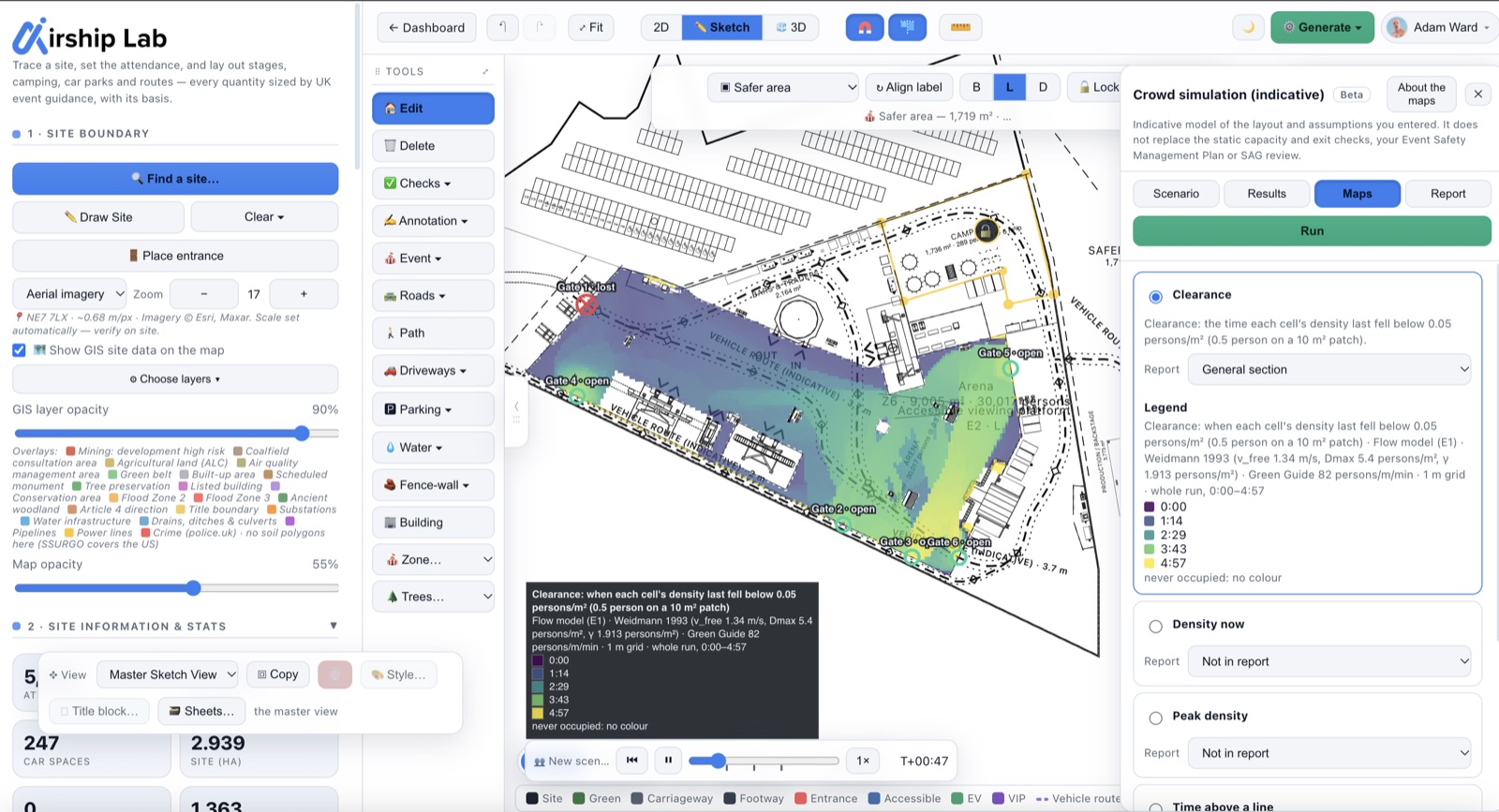
In-built crowd simulation engineHow long a modelled crowd takes to leave an enclosure, or the whole site
An indicative crowd model that sits beside the static exit figures and never replaces them. Run one enclosure, or the whole site to the gates on its boundary.
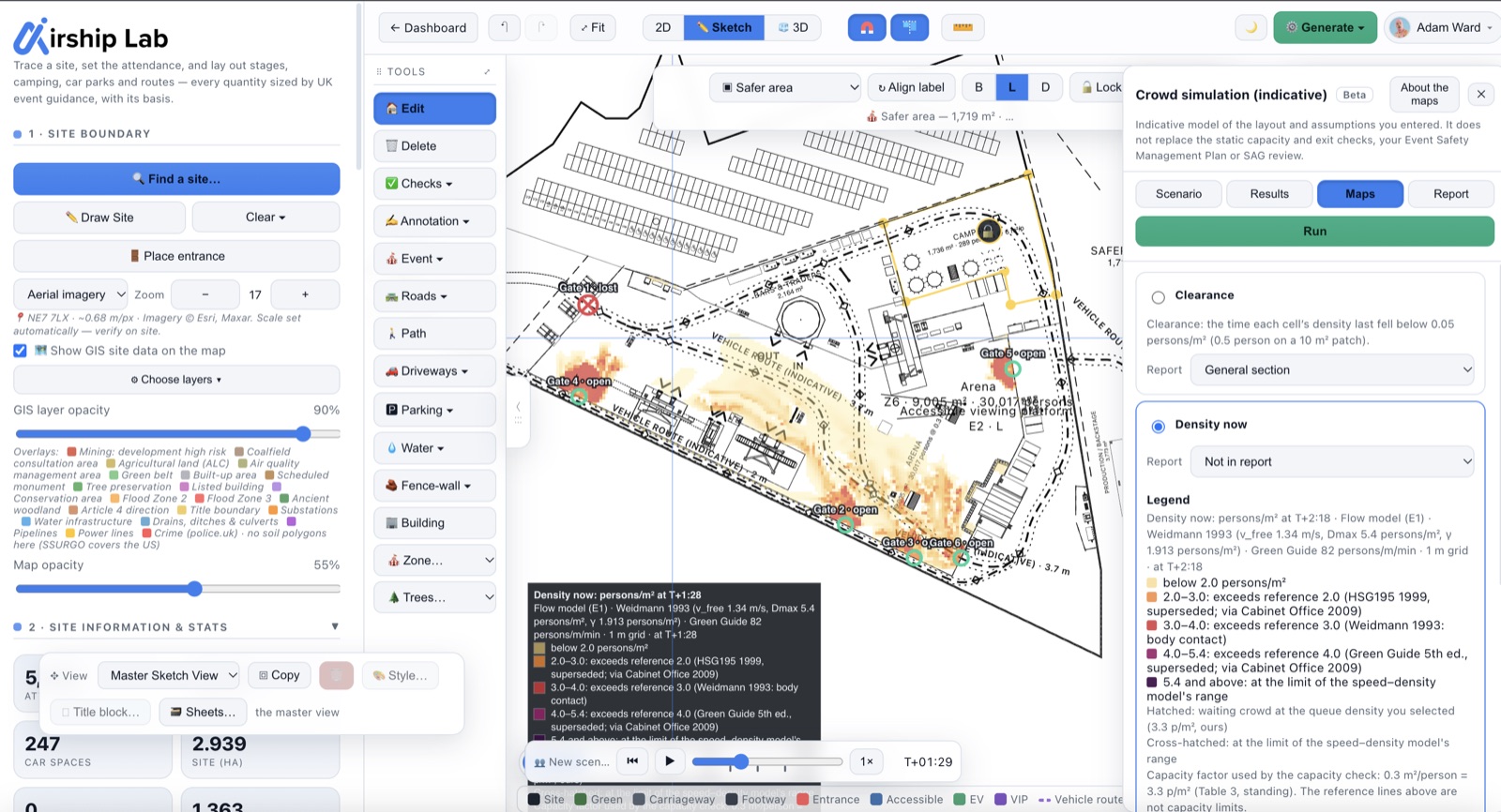
- One enclosure, or the whole siteThe busiest zone or any other, to its own exits; or the whole site to the gates on its boundary, with the attendance shared among the crowd zones by their capacity. A flow model — one crowd on a 1 m grid, not individual people — moves the modelled population to the exits.
- Lose the largest exit, or choose which to blockBy default the widest exit is discounted — the same exit set the static check uses. Or tick the gates to block; the scenario follows a gate you move, and a blocked gate is never quietly treated as open.
- A labelled result, compared with the static oneThe time for the modelled population to leave through the exits — beyond them not modelled — beside the static figure on the same exits, for three pre-movement cases and, if you tick it, with every exit open. It says where the extra time comes from.
- A timeline you can playScrub through the run on the 2D plan, with maps of clearance and density, and a per-exit table.
- Saved with the designEvery completed run by an owner or editor is saved beside the design, so after you reopen it the Event Safety Plan prints the result without a re-run. Move a gate or change an input and the saved result reads out of date, never as current.
- The crowd over the dayPeople on site, arrivals a minute and the entry queue, minute by minute over the gate hours, from your attendance, arrival curve and entry lanes. Site-wide totals with no locations, labelled illustrative while any input is ours.
What it is not. It does not replace the static capacity and exit checks, your event safety management plan or Safety Advisory Group review. It is not validation against measured crowds, and it leaves out crowd pressure and crush, smoke and panic. It stops at the exits and shows nothing beyond them, and a whole-site run counts only the people in crowd zones, not those in car parks or queuing at an entrance. It never presents a result as an approval.
How it works today. One enclosure or the whole site, on the 2D plan. Results are saved beside the design, not inside it, and the playback itself is not saved, so replaying needs a run. The Event Safety Plan prints a scenario only when you tick it in. It is a separate beta, switched on alongside Event Designer.
Event Designer is included from ProPlans for organisers, consultants and event teams
The same plans as Airship Site Designer, so one subscription covers event sites and everything else you design. Cancel anytime.
Pro
- Event Designer: size, lay out, check, cost and issue
- Checks that cite their source, by phase
- Hire budget and supplier-neutral quote request
- Vendors: find, shortlist, request and accept quotes
- Event Safety Plan appendix, PDF and DXF at true scale
- Martyn's Law readiness and a restricted Security plan
- Fairground ride layout checks
- Crowd and evacuation modelling (separate beta)
- Flood and ground readings for sites in Great Britain
- Review and share links, version history
- 25 AI photo renders/mo
Studio
- Everything in Pro
- Team workspace and 5 seats
- Live collaboration, comments and markups
- Your own 3D object library
- Reference images for AI renders
- 100 AI photo renders/mo
- Priority support
Enterprise
- Everything in Studio
- 300 AI photo renders/mo
- SSO (Azure AD / Okta)
- White-label branding and custom domain
- Dedicated onboarding and support
Event Designer is in beta and is switched on per account: choose Pro or above, then tick Preview BETA features in your profile or ask us, and we will get back to you about switching it on; each member of the workspace accepts the beta terms on first use. Ticking the box asks for access; it does not switch Event Designer on by itself. Event Designer is not part of the Free plan.
Questions event teams ask
Can I use Event Designer now?
In beta, yes. It needs the Pro plan or above, and the Event Designer beta switched on for your workspace: ask us to switch it on and we will get back to you. If you already have an account, tick Preview BETA features under Edit profile on your dashboard to register your interest.
Will it get my event approved by the Safety Advisory Group?
No tool can do that, and this one does not claim to. It gives you a site plan, schedules and findings with the basis of every figure shown. They are inputs to your event safety management plan; the Safety Advisory Group, the licensing authority and your own competent advisers decide.
Does it check whether a fairground ride is safe?
No. A ride's engineering safety belongs to its controller and the inspection scheme behind it. Event Designer checks the layout around the ride: clearances, entrances and exits, generator capacity and whether it is built before the public arrives, and, under the Wales model byelaw pack, fire-appliance access to it.
Is Martyn's Law in force?
Not yet. As read on legislation.gov.uk on 20 October 2026, the duties of the Terrorism (Protection of Premises) Act 2025 are not in force and no commencement day has been appointed; the SIA (guidance of 17 July 2026) expects commencement in spring 2027. The readiness check in Event Designer is a planning aid, not the security document and not legal advice.
Does the crowd model simulate the whole site?
It can run one enclosure or the whole site, to the gates on its boundary. Either way it is an indicative flow model of the crowd leaving: how long the modelled population takes to leave through the exits, with what happens beyond them not modelled. On the whole site the attendance is shared among the crowd zones by their capacity, so people in car parks or queuing at an entrance are not counted. It sits beside the static figures and never replaces them, and it is a separate beta.
Does Airship check the vendors?
No. Airship does not check businesses. Every figure, document and price a vendor gives is shown as their own statement. An admin reads a listing for spam, abuse and false claims of endorsement before it can be found, and that is all listing means. Checking a vendor's insurance, documents, equipment and competence stays with you, as the event-safety guidance expects.
Does it work outside Great Britain?
Event Designer is UK-first: the guidance is UK guidance. Flood and ground readings cover England, Wales and Scotland. A site in Northern Ireland reads "not checked" for flood rather than a reassuring zero.
Plan your next event site with Airship Event Designer.
In beta on Pro and above, switched on per account. Tell us about your event and we will get back to you about switching it on for your workspace.